Kosh v0.3: One Vault Became Many
2026-08-08
Kosh is a command-line password manager I’ve been building: a single static binary, no daemon, no browser extension, no cloud. Two things changed in this release.
Profiles. Until now Kosh had exactly one vault. It now supports separate encrypted vaults, each with its own master password, switchable in one command. Existing vaults migrate automatically on first run.
Search got rebuilt. The old ranking had a flaw I only noticed once I had enough credentials to trip it: a password I used constantly would beat the one whose name I had literally just typed. Fixing that properly meant rewriting how scores combine, replacing the edit-distance algorithm, and putting the whole thing under test. kosh gpat now finds git_personal_access_token.
This was also the release where I stopped adding features long enough to learn how the things underneath actually work, so I’ve noted what I picked up along the way.
Profiles
A profile is a vault of its own - its own file, its own master password, its own credentials. Every command reads and writes the active profile only, and unlocking one grants no access to any other.
kosh profile create work     # create a profile and set its master password
kosh use personal            # switch profiles
kosh use                     # ...or pick one interactively
kosh profile list            # see them all, and which one is active
Every line of output tells you where you are:
(work) [✓] credential saved successfullykosh use [profile] switches the active profile. With no arguments it opens an interactive picker - type to filter, enter to select, esc to cancel. The choice persists across runs.
kosh profile list [filter] prints a table of every profile and marks the active one. It reads names only, so it opens no vault and asks for no password.
kosh profile create <name> creates the profile, sets up its vault with a master password of its own, and switches to it. No separate kosh init needed.
kosh profile delete <name> deletes a profile and everything in it, guarded four ways: the active profile can’t be deleted, that profile’s own master password must be entered, a confirmation phrase must be typed in full, and the vault file is overwritten before it is unlinked.
kosh copy <id> <profile> copies a credential into another profile - decrypted with the active profile’s password, re-encrypted for the target under a fresh ephemeral key. The original is untouched.
Automatic migration
On first run, ~/.kosh/kosh.db moves to ~/.kosh/profiles/default.db and becomes your default profile.
~/.kosh/
├── config.json          # which profile is active
└── profiles/
    ├── default.db
    ├── work.db
    └── personal.db
Nothing is re-encrypted and your master password is unchanged - it’s a rename, not a rewrite. The migration runs once and refuses to overwrite an existing default profile.
What I learned: schema changes now run through a versioned migration table rather than ad-hoc CREATE TABLE IF NOT EXISTS calls scattered around startup. The version number is the whole trick - it turns “has this already run?” from a guess into a lookup, and it means the next migration is a new numbered step rather than an edit to an existing one.
Profile names become filenames
kosh profile create work has to put work somewhere, and it becomes work.db. Names are now sanitized on creation: accents folded to ASCII, anything outside A–Z a–z 0–9 _ - removed, spaces converted to underscores, runs collapsed, and the result capped at 252 characters - 255 minus .db.
| You type | You get |
|---|---|
My_profile $100 | My_profile_100 |
work-white-space | work-white-space |
--YourProfile__ | YourProfile |
work main | work_main |
café | cafe |
nul, lpt2 | rejected - reserved by the operating system |
$__## | rejected - invalid profile name |
Sanitization is silent, so if you type something exotic, run kosh profile list to see the name you actually got.
What I learned: a filename is not a string. It has a byte-length limit, a reserved-word list, a normalization form and a case-folding rule, and all four differ by platform. Windows still reserves the DOS device names - con, nul, lpt1 - and reserves them with extensions, so con.db is the console, not a file. Kosh rejects them everywhere, including Linux, because the profiles directory is meant to be portable.
Case-insensitive filesystems
On Linux, work.db and Work.db are two files. On Windows and macOS they’re the same one. So a pair of profiles that coexists happily on one machine silently collapses into one when you copy the directory to another.
Kosh’s rule now: filenames keep the casing you chose, lookups ignore case, and you can’t create two profiles differing only in case - on any platform, including the ones where the filesystem would allow it.
What I learned: the implications go further than “don’t create duplicates”. Once lookup ignores case, every command has to go on using the name that’s actually on disk rather than the one that was typed. Miss that, and kosh profile delete WORK finds work.db, then opens an empty new WORK.db beside it, sees an uninitialized vault, and skips the password check. The lookup succeeds and everything after it is wrong. Making the lookup return what it found instead of a yes/no is what stopped that class of bug.
Secure delete, and what it’s actually worth
kosh profile delete overwrites the vault file with random bytes and syncs to disk before unlinking, on top of SQLite’s secure_delete=ON.
What I learned: this is best-effort, and I’d rather say so than imply otherwise. The old advice about multi-pass overwrites comes from 1990s magnetic encoding, where residual magnetism could in principle be read back - that hasn’t applied to modern drives for a long time, and a single pass is the current guidance for spinning disks.
On an SSD it’s weaker still. The drive’s controller does wear levelling: when you overwrite a logical block, the write lands on a different physical page, and the original is marked stale and left for garbage collection to erase whenever it gets round to it. TRIM tells the controller which blocks are free, but you don’t get to choose when the flash is actually cleared. From userspace, you cannot reach the bytes you’re trying to destroy.
So the overwrite is defence in depth, not a guarantee. What actually protects a deleted vault is that everything in it was encrypted at rest - whatever survives in stale pages is ciphertext with no key.
There was also a real bug here, caught before release: the overwrite opened the file with os.Open, which is read-only, so every write went nowhere. One flag, os.OpenFile(path, os.O_WRONLY, 0600). Nothing looked wrong - the code read correctly and ran at the right moment. The only way to catch it was to delete a file and go look at the bytes, which is what the test now does.
Search, rebuilt
Kosh ranks credentials on four signals: how well the query matches the label, how well it matches the username, how recently you used it, and how often. All four were wrong in some way. Fixing them was two rounds of work, and it’s the part of this release I’m happiest with.
Habit was outvoting the query
Scores used to be additive:
score = label + user + recency + frequencyEach term is reasonable alone. Added together, they let usage statistics compete with match quality on the same scale - and given enough usage, statistics win. A credential you reach for daily could surface for a query it shared almost no characters with.
Two things caused it. The frequency curve was log(count+1) / 5, which crosses 1.0 at a few hundred uses, so a well-worn credential’s frequency term alone could outweigh a decent text match. And addition gave it somewhere to spend that. The fix was to make behaviour a multiplier rather than a competitor:
score = (label + user) × (1 + recency + frequency)Now a bad match multiplied by heavy use is still a bad match - the whole expression collapses toward zero when the text score does. Recency and frequency can only amplify a match that already exists, which is the job they should have had. The frequency divisor went to 15, flattening the curve threefold so it stays inside its own budget, and the global access-count reset threshold dropped to 2000 so no credential dominates for long.
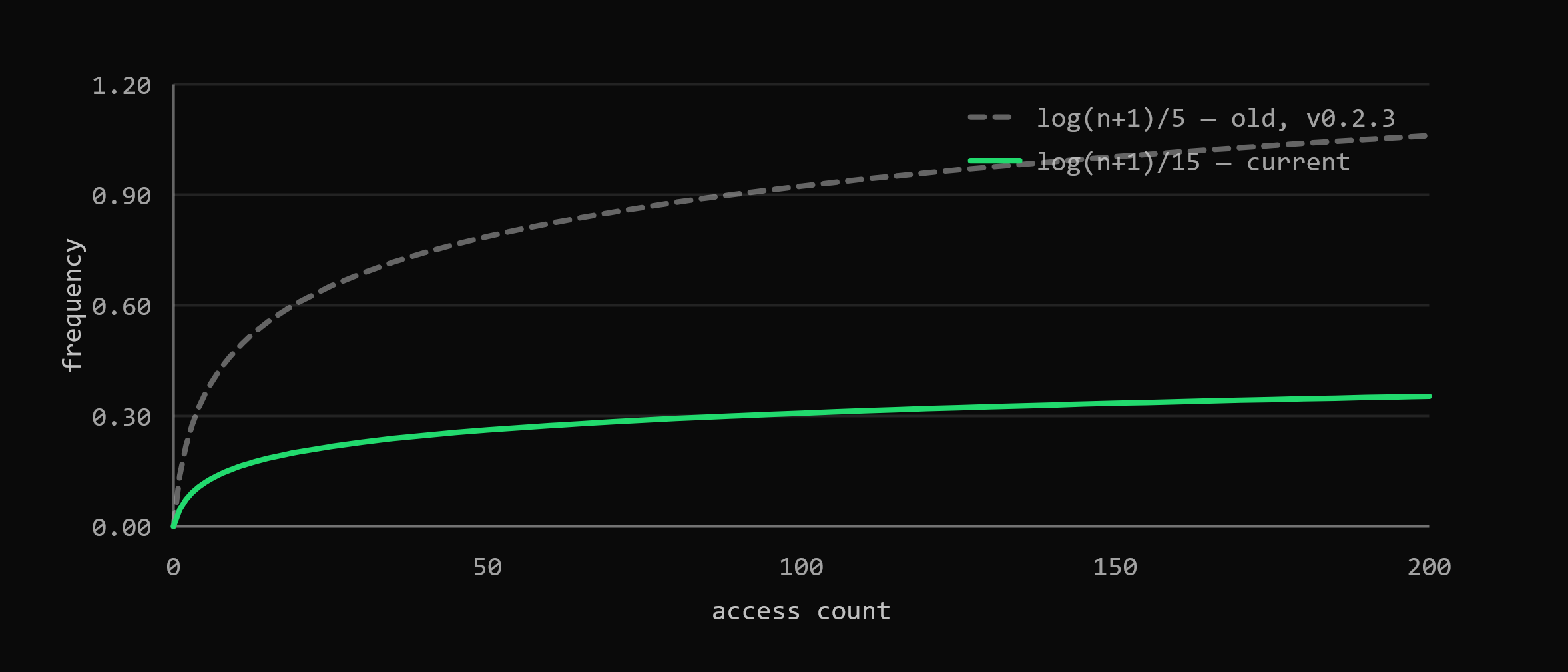 The old curve crossed 1.0 and could outweigh a text match on its own; the new one stays inside its 0.05 weight no matter how often you reach for a credential.
Current weights: label 0.60, user 0.20, recency 0.12, frequency 0.05. Recency decays with a ~12-hour half-life.
Prefix matches could beat exact ones
The boosts for prefix and substring hits were flat additions. An exact match is capped at 1.0, so a partial match with a boost stapled on could mathematically exceed it - searching for the exact name of a credential could rank it second.
Boosts are now asymptotic. Instead of adding a constant, each one closes a fixed fraction of the gap between the current score and the ceiling:
simScore += (MAX_STRING_SCORE - simScore) * PREFIX_BOOST // 0.8The score approaches 1.0 without ever reaching it, so a lower tier can’t climb into a higher one no matter how the other terms land. That makes this hierarchy a property of the formula rather than something that happened to hold for the inputs I tested:
exact > prefix > substring > ordered subsequence > fuzzyWhat I learned: when you add signals together you aren’t weighting them, you’re letting whichever has the largest range decide. If one signal should only ever adjust another, multiply. And if an ordering matters, make it structural - a boost that can’t cross a ceiling needs no test to stay correct, though I wrote the tests anyway.
Typos and abbreviations
kosh gpat      # → git_personal_access_token
kosh crat      # → cart   (transposed letters cost one mistake, not two)
Similarity ran on plain Levenshtein distance, which charges two edits for swapping adjacent characters - one deletion, one insertion - even though transposition is the single most common typing error there is. Damerau-Levenshtein treats an adjacent swap as one operation, so crat sits one edit from cart instead of two.
Abbreviations needed a separate idea. gpat against git_personal_access_token is a terrible edit-distance match - almost every character is a deletion - but the query’s letters do appear in order within the target. That’s what an abbreviation is, so ordered subsequences get their own asymptotic boost (0.4), slotted below substring matches and above pure fuzzy ones.
What I learned: edit distance answers “how many mistakes”, not “did you mean this”. Those come apart badly for abbreviations, and no amount of tuning the distance function fixes it - you need a different question. Also that similarityScore returned NaN when both strings were empty, because dividing by a zero max-length is something you only find by writing the boring test.
Under test
All of this ships with the ranking behaviour pinned: transposition handling, non-adjacent swaps not collapsing to one edit, subsequence boosts, out-of-order sequences scoring lower than in-order ones, end-to-end ranking by recency and by frequency, the full boost hierarchy, label-vs-user query composition, and deterministic tie-breakers - equal scores fall back to access count, then alphabetical label.
Unicode, and transformer pipelines
café can be written two ways that render identically: e plus a combining acute, or a single precomposed é. Before normalization those produced two different profiles.
The fix decomposes, strips combining marks, and recomposes:
transform.Chain(
    norm.NFD,
    runes.Remove(runes.In(unicode.Mn)),
    norm.NFC,
)
What I learned: transform.Chain isn’t just tidier than running three passes by hand. Chained transformers stream through a shared buffer, so the text is processed once rather than being materialised into a new string between each stage. Composing the pipeline and then running it beats running each step eagerly.
Tests, and the refactor that made them possible
At v0.2.3 this project had one test file. It now has six - search scoring and edit distance as above, plus crypto round-trips and tampered ciphertext, file scrubbing, profile naming and resolution, and relative time.
What I learned: most of the work of testing happened before any test was written. Commands used to reach for package globals; they’re now built through a shared application context, and the vault and profile layers sit behind interfaces. That’s what let me stand up a throwaway home directory and a fake profile service and ask questions I couldn’t have asked otherwise - the case-collision bug came straight out of one of those. Dependency injection stopped being an abstract preference the moment it was the difference between a test I could write and one I couldn’t.
Structured logging
Debug output no longer requires a rebuild. The logger.BuildMode ldflag is gone; set KOSH_DEBUG instead:
KOSH_DEBUG=1 kosh list          # bash / zsh
$env:KOSH_DEBUG=1; kosh list    # PowerShell
What I learned: moving to log/slog changed what a log line is for. Key-value pairs instead of formatted sentences means you can filter on a field instead of grepping prose, and it made a security nicety possible: credential types implement their own log representation and redact their secrets, nonces and ephemeral keys, so debug output physically cannot print ciphertext by accident.
Smaller things
- One clipboard path. The Wayland special case that shelled out to
wl-copyis gone; every platform usesgolang.design/x/clipboardv0.8.0.kosh getandkosh searchalso write to the clipboard before updating access statistics, so failed bookkeeping can’t cost you the secret. - Errors don’t shout usage. A wrong master password used to print the error plus the full flag documentation. Runtime failures now print one line.
- Real tables in
kosh listandkosh profile list, auto-sized instead of truncated at fixed widths. - Relative timestamps -
02d 04h ago,just now,never. - A caution block before anything that destroys a secret nothing can replace, followed by a confirmation phrase typed in full.
- Consistent language across every message, error and prompt, and full
--helpfor every command with worked examples.
Fixes
Ctrl+Cduring a password prompt no longer leaves your terminal with echo disabled - Kosh restores terminal state and exits130.Ctrl+Cduringkosh profile createno longer leaves a half-created profile behind. Nothing is written to disk until the vault exists, because cleanup code is a promise you can’t keep once the process is gone.- Search ranking: frequently-used credentials outranking closer matches, prefix matches beating exact ones, and a
NaNsimilarity score for two empty strings - all covered above. - An empty or whitespace-only query used to match everything. It now matches nothing.
kosh generate --lowerwas documented as “include uppercase letters” in--help.
Security
- Every profile has its own Curve25519 keypair, its own Argon2id salt, and its own master password.
- Master-password and secret confirmations use constant-time comparison.
- Decrypted secrets are handled as
[]byteend to end rather than copied into immutable strings. - Profile deletion refuses any name that isn’t a plain entry of the profiles directory - a name is a name, never a path.
Under the hood
Commands are built through a shared application context instead of package globals, the vault and profile layers sit behind interfaces, and errors are handled at one boundary rather than logged at every layer on the way up.
Dependencies were refreshed across the board: x/crypto 0.54.0, x/term 0.45.0, modernc.org/sqlite 1.54.0. Still a single static binary, still no CGO. docs/architecture.md documents the full cryptographic design, and Kosh is now MIT licensed.
Install: grab a binary below, or go install git.plutolab.org/plutolab/[email protected] Docs: kosh.plutolab.org Full changelog: v0.2.3...v0.3.0